
Your cart
There are no more items in your cart
Dropshipping - How to use Embroidery
The GoCustom Dropshipping team offer high-quality embroidery across a wide range of garments. On selected products, you will be able to mix embroidery and printing on the same garment. For example, you may wish to have an elegant logo embroidered on the left chest of a sweatshirt and a bold large print on the rear. This flexible approach allows you to make the garments that are right for your audience.
Getting Embroidery Right
Embroidery is a complex process, there's lots to consider when thinking about getting a design ready for embroidery, we recommend you view our design guidelines.
Embroidery design guidelines
How Embroidery Works
When you choose a garment that includes embroidery options, you will need to select the design area you wish to be embroidered. Make sure you have 'embroidery' selected and not 'Printing'.
When you upload your design our software will interrogate your design and automatically allocate up to 6 thread colours. Designs can only be embroidered with a maximum of 6 colours.
Threads are automatically allocated, but you can also manually choose the thread colours that you would like to use. 
Thread Colours
Our system currently allows you to choose from 16 different thread colours.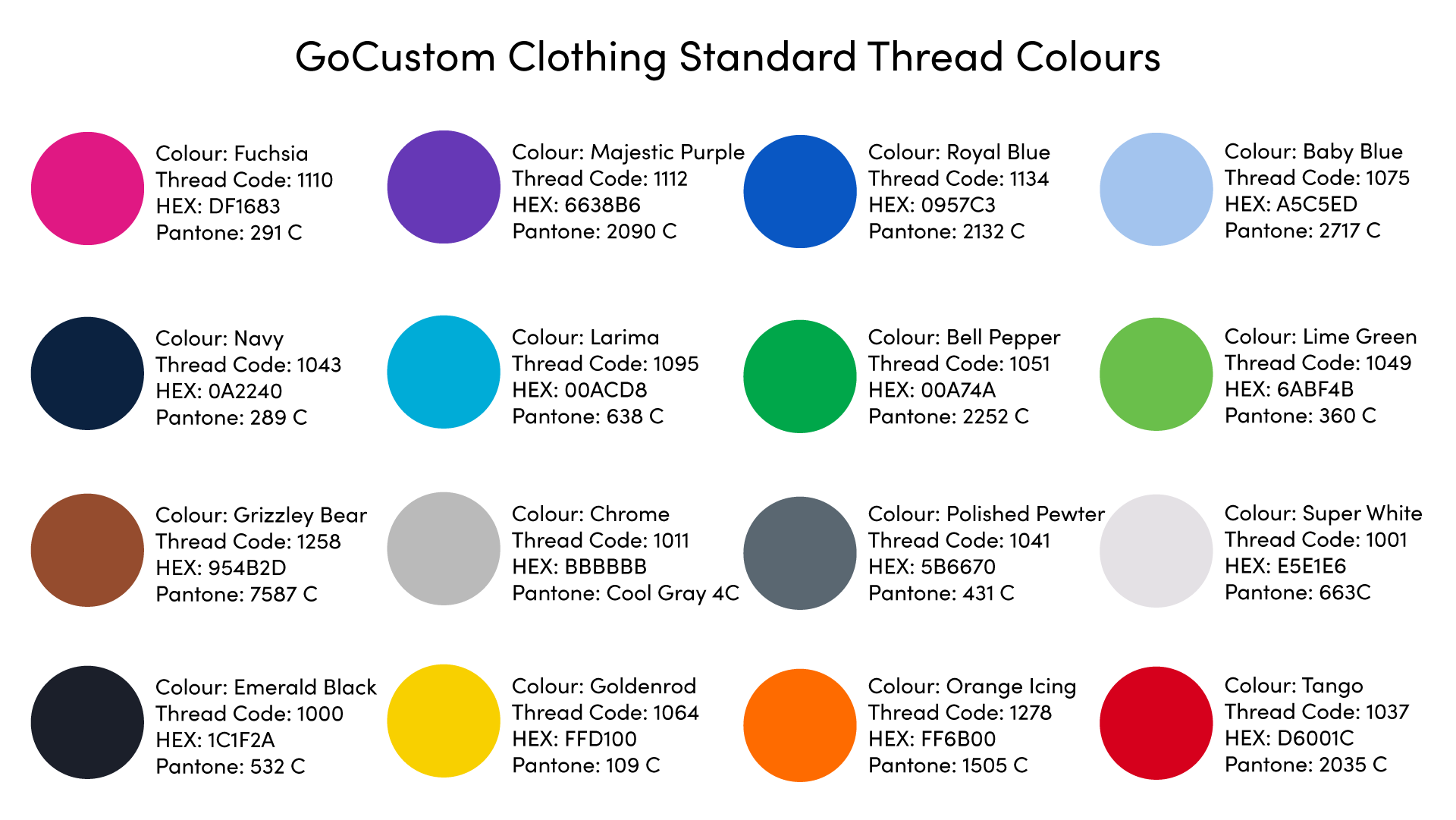
Embroidery Digitisation Charge
Unlike digital printing, we can't just send your design directly to the embroidery machine. We need to have a digitisation specialist prepare a special embroidery file from your design. We will prepare a proof of this design and ask you to approve it before we produce any garments. Note that for every new or altered embroidery design, there is a set-up charge of £15+vat. This is only charged once. When you add or alter an embroidery we will contact you separately to request payment of the set-up charge.
Note that for new embroidery designs, the lead time for the first product will be longer than our usual 3-5 days.
Order A Sample
We suggest that you order a sample of any new embroidery designs that you create. This allows us both the time to prepare and agree on your embroidery file before you make the product available for your customers to purchase.
The other benefit of ordering a sample is that you can use it to take photographs of your products for merchandising, photography of embroidery is usually better and more convincing to your customers than the computer-generated mockup.
Exporting products to your store
We suggest that you do not export embroidery products to your store until you have signed off the digitisation proof and are happy with the sample you have ordered.
Can I use the same embroidery design on different garments?
If the size of the embroidery area is identical, you can use it on lots of different garments and positions. However if the size is even slightly changed, this will be treated as a new file and a new set-up charge will be levied. For example, it is unlikely we can use the same set-up on a sweatshirt and a baseball cap unless you set the max height of your design at 55mm for both garments.
Stitch Count Limits
When we digitise your design, we will analyse the number of stitches required to produce it. We have a standard limit of 12,000 stitches for each embroidery position. If your design exceeds 12,000 stitches we may try to simplify your design or our experts will discuss with you how to change the design.
I want my embroidery to be bigger
Unfortunately, as per the stitch limit above, we cannot allow for embroidery areas larger than those defined on the garments.